• Skip to primary navigation
  • Skip to main content
  • Skip to primary sidebar

Lots of Helpers

Our family's life in New Zealand

  • Home
  • Our Library
  • Math Freebie
  • Contact Us
  • Legal Policies
    • Disclosure and Disclaimer
    • Privacy Policy
You are here: Home / Archives for Product Review

Product Review

Product Review—MathandAlgebra.com

November 4, 2020 by NZ Filbruns Leave a Comment

Disclaimer: I received a FREE copy of this product through the HOMESCHOOL REVIEW CREW in
exchange for my honest review. I was not required to write a positive review nor was I
compensated in any other way.

One thing I rarely request for reviews is a math curriculum. I’m happy with what we have, and it’s hard to switch to anything else. We ended up being put on the MathandAlgebra.com review, though, so I’ve been using it to supplement Mr. Sweetie’s regular math book. He’s been doing some of each, and when he finishes his regular math for the year this week, I’ll keep him doing this Basic Math for another month or so, to help prevent that “summer slump.”
There are four levels in this online homeschool math program. There is Basic Math, Advanced Math, Pre-Algebra, and Algebra. Basic Math starts with whole numbers and moves on to fractions, decimals, ratios, proportions and percents, and geometry, algebra, charts and graphs, probability and statistics, and word problems. Each topic has 4-16 lessons. Each lesson has a roughly 5-minute video lesson and a worksheet. Each section ends with a quiz, and there is a final quiz at the end of the level. To begin, I had Mr. Sweetie do the quiz at the end of each section, and if he got everything right, I figured he didn’t need to go through the lessons in that section. When he reached the part about ratios, proportions and percents, he didn’t do well, so he started there. He says that the lessons are presented clearly, and he is obviously understanding the concepts. This is something he hasn’t done much with in his regular math lessons, but he’s doing well here. He watches the lesson, works the sample problems with the instructor, and then works the rest of them on the worksheet himself. There is an answer key that he opens separately, and checks his own work. Each worksheet has about four review problems, ten for the new concept, and a word problem at the end. There are also speed drills, which we haven’t used yet because he still has them with his other math book. MathandAlgebra.com-2

Advanced Math covers the same topics as Basic Math; I presume it goes into more depth with everything. Pre-Algebra starts with sets, integers, fractions and decimals, and goes on to exponents and square roots, ending with number theory, number lines and coordinate systems, equations, and more about probability and statistics. Algebra starts out with 22 lessons on “Tools for Algebra.” Then it goes on to equations, solving and graphing them, polynomials and quadratic equations, and finishes with algebra word problems.IMG_6940

This seems to be a fairly thorough math program. It would be great for a student who needs to get through several years’ worth of math in a short time. There are no extras here, and no busywork. In a lot of ways I’m impressed with it. One real plus is that the child can do it with no help from Mom. I showed Mr. Sweetie how to reach the site through a bookmark, login, resume where he left off, and print his worksheet, and he was off. I rarely have to help him at all with this. So, if you’re struggling with math, and have a child who is 10 years old or older, this might be just what you need. It is recommended for grades 4 and up.

The group leader’s console is very basic. Mostly, it allows me access to all the courses; one tab allows management of students. Under that tab are two tabs; one lets me remove a student, and the other gives a report of their progress. This picture shows Mr. Sweetie’s progress. As you can see, he got 60% on his first try of the Ratios quiz, but 100% after going through the lessons. He starts Geometry today, and he’s a bit scared of it, but I’m looking forward to seeing how he does.MathandAlgebra.com-1

We did find a few problems. They were fairly minor, just a bit annoying. One lesson had exactly the same worksheet as the one before it, and a couple of times the answer key had the wrong answer. I went over the problem several times to be sure. I also had trouble getting Mr. Imagination logged in when I wanted him to start using this for review here over the summer after he finished his regular math. I contacted support, however, and they got on to the problem quickly and got it solved.

Bottom line? If you need a math program when you just don’t have time to spend with your children, you might want to check this one out. I saw on their website that they offer a 30-days trial with your money back at the end if this program doesn’t work for you, so it may be worth checking out. Also, have a look at what 48 other families said about this program!

Math & Algebra Family Subscription {MathandAlgebra.com Reviews}

Filed Under: Book Reviews Tagged With: Homeschool Review Crew, Homeschooling, Product Review

Product Review—Homeschool Easy

August 25, 2020 by NZ Filbruns Leave a Comment

Disclaimer: I received a FREE copy of this product through the HOMESCHOOL REVIEW CREW in
exchange for my honest review. I was not required to write a positive review nor was I
compensated in any other way.

I have been using the 1st Grade Entire School Year Curriculum from Homeschool Easy with Little Miss lately. She finished her preschool and kindergarten books about a month ago, and was eager to learn to read, so I thought this level would be a good fit for us. She was excited about trying something new, too.

We received the entire year of materials from Homeschool Easy in a zip file.UntitledWhen I extracted it, I found seven folders, one per subject, plus two PDF files about how to use the curriculum and an overview of it. Each week, I opened each of the folders, found the folder inside that for the week we were ready for, and printed the pages for the week. We simply worked our way through the worksheets each day, going back to the guide for some of the subjects in order to find the links we needed for videos or online books. It took an hour to an hour and a half a day to do all the work, which I thought was pretty good. Little Miss enjoyed most of this schoolwork, and it took little enough time that she didn’t get bored.

We started most days with the Math. I was very surprised, when we started working with this math course, that it jumped right into place value. Obviously, children are expected to know their numbers when they start this course! Little Miss is quite advanced with her numbers, so it wasn’t a problem for her. We cut out the paper place value blocks that were provided, and she enjoyed building each of the numbers she was told to. She quickly caught on to place value and had no trouble with it. By the fourth week, she had worked on ordering numbers up to 200, and was adding, too. This course seemed to move ahead very quickly; I have some children who wouldn’t have been able to handle it as well as Little Miss did. Looking ahead, I see that addition and subtraction are pretty thoroughly covered, as well as skip counting. Money and graphs are also introduced. In this photo, she had built the number 145 with the paper place value blocks.33-IMG_6570

We usually worked on Reading next. This presumed that the child would know the entire alphabet and how to sound out words already. The first lesson introduced a number of sight words. I made a number of changes in how we used the program in this subject, since Little Miss wasn’t ready for reading sight words yet. She learned a few of them, and I helped her read the content in the lessons. Each lesson introduces a group of words (words with a particular short vowel, or long vowel, or other combination, or simply high-frequency words). The first page has a word list and several sentences using the words. Then there are several pages of flashcards to print, cut out and glue together, and then a couple of pages of sentences with blanks to fill in. There is a crossword puzzle and a word search with the week’s words, and some comprehension activities.

The next thing we usually did was Grammar. We learned what makes a sentence, and then about different kinds of sentences. Nouns, verbs, adjectives and adverbs are introduced later in the year. Each week has a page for each day, in which the child either copies a sentence correctly or writes their own.

Little Miss’s favorite subjects were Book Reading and Science. 21-IMG_6565She especially loved the Book Reading. We were able to access books online to read together by clicking a link in the monthly guide. Most of the books are very simple and repetitive, and she loved helping me read them, and enjoyed answering the questions on the worksheet, too. Some of the books are nonfiction, and some are fiction. She wants to keep on doing them! For Science, we often watched YouTube videos and then answered questions about them. She didn’t like the first one, but she enjoyed the rest (the first was “too silly”). We studied plants while we used this course; bugs, mammals, birds and water animals come up later in the year. This was one of her favorite science projects—she has always loved picking flowers!

History is one subject we struggled with in this curriculum. It is very American, and the first month’s theme is Patriotism. We don’t live in America, so it didn’t apply to us. We simply skipped a few things, like the page that said to color the country we live in—it was a map of the United States! Month 2 covers the Presidents, and Months 3-8 study the geography and history of the United States.

I appreciated the Writing subject. Each week there are two writing prompts given, with several lines on which to write a short story. These have been very helpful. We are part of a writing group, and it’s hard to come up with topics. Using these papers has really helped Little Miss come up with things to take along to share with the group.

It was interesting to use a new curriculum for a few weeks. I was disappointed in how advanced it was, since it was for first grade. I would have expected it to start out a lot simpler. Little Miss is advanced enough that I would have been able to teach her to read using this, but it would definitely have taken longer than the schedule allowed for. Most of my children, however, would not have done well with this. There are very few directions for the teacher; you need to know how to teach a child in order to use this. If you are confident, however, and just need a framework, this might be a very good choice for you. The cost is fairly reasonable for a full year of school curriculum, and since it’s digital, it’s fully reusable for other children. A lot of printing is required, so that has to be factored in. All the materials needed, though, are available online and easy to find by just clicking links. Have a look at what other people have to say about this curriculum—I’m especially interested in reading some reviews of other levels, since there is a complete year’s curriculum available for grades 1-5. Click on the image below to find the other reviews.

Homeschool Curriculum for Grades 1 to 5 {Homeschool Easy Reviews}

Filed Under: Book Reviews Tagged With: Homeschool Review Crew, Homeschooling, Product Review

Product Review—Journey Homeschooling

July 29, 2020 by NZ Filbruns Leave a Comment

Disclaimer: I received a FREE copy of this product through the HOMESCHOOL REVIEW CREW in exchange for my honest review. I was not required to write a positive review nor was I compensated in any other way.

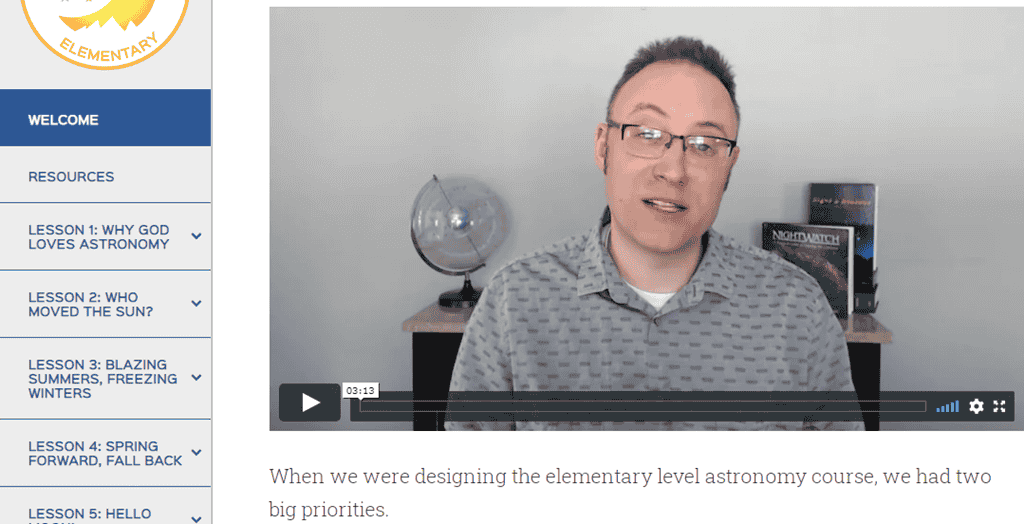
About six weeks ago, we were presented with the opportunity to do a course from Journey Homeschool Academy, and had to choose between two topics. The children and I spent our science class time for a few days checking out the various sample lessons offered for the two courses, and decided that Experience Astronomy: Elementary looked pretty interesting. We learned a lot just from the two video lessons that were available as samples! We’ve been using this program now for five weeks, and are really enjoying it. We’re watching the lessons with the whole family, while the evening dishes are being washed. We’re only doing one lesson a week, so just one night a week is spent on astronomy. I decided to do it this way so that Gayle and the older boys can learn about the heavens, as well. We haven’t spent much time with astronomy, so this will plug a gap for them.

So far, we have had an overview of astronomy, learned how the earth revolves and rotates around the sun, the seasons, the phases of the moon, and what constellations are. The lesson about the phases of the moon was one of the sample lessons, so for the past month we’ve been observing the moon as it went through a complete cycle. Watching the lesson for the second time was very good to help cement the concept. One thing we really liked about it was that the teacher showed the way the moon appears in the Southern Hemisphere! Almost everything is aimed at the Northern Hemisphere, it seems like, since most educational materials are produced in the United States. This is, too, but he teaches about both. We could really relate to what he was saying, since we’ve observed the differences ourselves when we traveled back for a visit.Untitled

Each lesson, as I mentioned, has a video. This is usually about 15 minutes long. IMG_6594It is accompanied by a 2-3 minute Memory Video, with the main points the teacher wants us to remember. There is also a PDF with supplementary material. This always includes some suggested books to read, a craft activity, several pages of handwriting practice, notecards with the memory points, and a quiz. We’re using the notecards (I have them taped to a cupboard door) and the quizzes, and we’ve done a couple of the crafts. Mr. Imagination loved making a “planetarium!” I like the quizzes to help us think about the video lesson again the day after. It also makes a very easy science class! 18-IMG_648213-IMG_6481

Another project we did, which the children really enjoyed, was creating a constellation from marshmallows and toothpicks. Can you guess what the favorite part was? Eating the marshmallows afterward!IMG_6597

These lessons are very much based on the Bible. In every lesson so far, we have been taken on a “field trip” to some ancient archeological site where there was evidence of ancient man worshipping or studying the heavenly bodies (the sun, moon, or stars), but the teacher is very careful to point out that worship of these things was not what God wanted. Also, one of the assignments for the course is to memorize Psalm 8. Most of my boys already know it, so they recite it along with him when he quotes a verse.

Looking ahead, I’m seeing more lessons on the constellations, and then some about eclipses and meteors. After that, it looks like we’ll be making a trip through the solar system before a couple of final wrap-up lessons. This looks like fun! I’m really enjoying this course, and I know some of the rest of the family are, too. Some won’t admit it, but they all sure pay attention when I put the computer on the table and turn it on. Since we do this on a night when the big boys are on dishes duty, they are a captive audience, too. We often quit using review products as soon as the review posts on my blog, but this is one that we’ll continue using till we reach the end.

Sixty-seven families have been using programs from Journey Homeschool Academy. If you’re curious what others say about these courses, as I am, click on the image below to read their reviews.

Experience Biology: Elementary Level, Upper Level and Experience Astronomy: Elementary {Journey Homeschool Academy Reviews}

Filed Under: Book Reviews Tagged With: Homeschool Review Crew, Homeschooling, Product Review

Product Review—MaxScholar

July 8, 2020 by NZ Filbruns Leave a Comment

Disclaimer: I received a FREE copy of this product through the HOMESCHOOL REVIEW CREW in
exchange for my honest review. I was not required to write a positive review nor was I
compensated in any other way.

I was quite interested to see how the MaxScholar Orton-Gillingham Software from MaxScholar works when I heard about it. Nine or ten years ago, I had two boys who were not learning to read, no matter what I tried. I came across some online programs that taught math skills, but I couldn’t find anything I liked that would teach reading. In answer to prayer, I finally found a physical program that worked. It was an Orton-Gillingham based program, so that made me curious about how MaxScholar was set up.

We actually haven’t used this program a lot. Little Miss (age 5) has used it more than her brothers; she really enjoys it. She started out with a test to find out what she knew. It turned out that she knew the sounds of 14 letters of the alphabet—more than I thought she would! She used MaxPhonics for several days after finishing the test, and then discovered Maxreading; both options are available for her when she logs in. With MaxPhonics, a letter is introduced by name, and then a keyword beginning with the sound is introduced (“yawn” for y, for example). After practicing the name, keyword and sound a few times, the student is to draw the letter “in sand” and on a line, using the mouse. Little Miss had a hard time managing that, but she enjoyed it. The last activity with each letter is to choose whether or not a series of words begin with the sound of the letter being studied. If a she got the word wrong, it was given to her again a few words later.Maxscholar 1

Little Miss was put into Level 0 of MaxReading. In this level, she chooses a “chapter”, which is actually a picture. The program asks several questions about the picture for her to think about, and then she moves on to a series of questions with multiple-choice answers. Each question and answer have a button beside them, which when clicked read the sentence aloud. After she chooses an answer, the program moves on to the next question. She’s really enjoying this section of the program.

Mr. Imagination was put into Level 2 of MaxReading. He chose the first book in the list, “Australia”, and has read the first two chapters. Vocabulary words are highlighted; he is instructed to click on them to read the definitions, then read the entire story. After reading the story, he is supposed to highlight the topic of the story, the main idea, and important details, then write an outline of the story. After that he is instructed to write about the story, choosing either to write a summary, answer an open-ended question, or answer a general question. The final activity for each story is a 5-question multiple-choice quiz. Once again, each question and answer have a button to click to hear it read aloud. Maxscholar 3

For MaxPhonics, he has the choice of working on consonants and short vowels, consonant blends, or digraphs. There are also several games available. I saw a memory game and one where you are to chose the missing part of a word. There is also a section called MaxWords, which teaches rules for breaking down words into syllables, and also covers prefixes and suffixes.

Mr. Sweetie was placed in Level 5 of MaxReading (out of 12 levels). His stories are more advanced, but follow the same progression for each lesson. His options for MaxPhonics and MaxWords are the same as the ones available for Mr. Imagination. He has several other programs available, though: MaxPlaces, MaxBios, MaxMusic and MaxVocab. MaxPlaces begins with a world map. A lot of cities have green dots beside them, and when you click on the dot you get to read a story about that city and then answer some multiple-choice questions about it. MaxBios contains short biographies of people in many different careers, with a quiz after the story. Based on the categories I saw, this is not a program I want my children to spend much time with. MaxMusic contains the lyrics of songs from many different performers and groups—once again, a program I’m not happy for my children to use. MaxVocab looks fun, though, with three types of games to play: Hangman, Definitions, and Word Search. Maxscholar 2

The teacher’s dashboard contains a wealth of resources. Of course, there is a section for generating reports of each child’s progress in the program, but I also found a section of materials for the teacher. These are actually lesson plans and techniques for teaching a child to read. They look very useful and doable! This program looks quite useful, however, since we already have the other program and have been using it, I will continue to use it. However, I can see it working well for families that need the extra help of letting someone else do part of the teaching. The games will be fun for my children, too. I like to have access to educational games for the odd time when the children want to play on the computer. This program is put together quite well and high quality. If you want to try it out for yourself, there are some lessons that can be watched to see how it works. Also, be sure to click on the image below to see what 60 other families have to say about MaxScholar!

MaxScholar Orton-Gillingham Software {MaxScholar Reviews}

Filed Under: Book Reviews Tagged With: Homeschool Review Crew, Homeschooling, Product Review

Product Review—Page A Day Math

June 3, 2020 by NZ Filbruns Leave a Comment

Disclaimer: I received a FREE copy of this product through the HOMESCHOOL REVIEW CREW in
exchange for my honest review. I was not required to write a positive review nor was I
compensated in any other way.

Every summer when we stop doing school for a couple of months, I start looking for worksheets for my younger boys to do, so they don’t lose all their math facts when they aren’t using them every day. Every year, I try something different, and I haven’t been very happy with anything I’ve found. Now, though, I think I have what we need! I looked at Page A Day Math when it came up for review, and was immediately interested. We’re in the middle of our school year right now, but it looked like just what we needed for extra practice now, and I definitely plan to use these kits in the summer when we’re taking a break.page a day math 2

Page A Day Math offers kits for each of the four math operations—addition, subtraction, multiplication and division. Each kit also includes some handwriting practice books, which I didn’t use so can’t comment on. You can buy either physical kits or digital ones; we were given the digital ones, which are to be downloaded and then printed. They can be used for as many children as you have—I like that! They are quite easy to print and staple together and make a great supplement to any math curriculum.page a day math 4

I printed a couple of the booklets from the Multiplication Starter Kit for Mr. Sweetie. He knows his multiplication facts, but is still pretty slow, so I thought he should get some more pratice. He times himself for a minute every day and does as many problems as he can in that minute. He’s getting faster! Each booklet introduces a new times table. The front and back of one page are to be done every day. First, the student is to trace each fact, and then write the answers. I don’t require Mr. Sweetie to do all the tracing, although he does a lot of the numbers because they are faint enough that he has trouble seeing them otherwise. (I’m guessing that when I get a new drum for our printer, later this week, the pages will print a little darker!)

Mr. Imagination is working through the Subtraction Starter Kit. These each focus on subtracting by one number (-1, -2, etc). As with the multiplication books, each page also has a lot of review of previously taught facts.page a day math 3

Little Miss is working with the Pre-K Math Starter Kit. This introduces the concept of addition; Book 1 teaches adding 1 to 0-10, Book 2 adds 2 to each number, and so on. I’m not sure what the difference is between these books and the Addition Starter Kit. Little Miss is doing well with these books. She’s been making up addition problems for me, and then she remembers the answers the next day, quite often.page a day math 1

Each kit comes with flashcards to print. I like the looks of them! They are meant to be printed on paper, then folded with the fact on one side and the answer on the other and glued together. Instead of just one fact on the addition and multiplication cards, there is a pair of “twins” such as 0+7= and 7+0=. I like that the facts will be correlated in the child’s mind that way. Of course, the subtraction and division cards only have one fact on each.

Each kit also comes with an assessment, which is useful to determine where to start the child. Based on the results of these assessments, I started Mr. Imagination in the first subtraction booklet, and Mr. Sweetie in the fourth multiplication one. IMG_6455

I really like that the children can work independently with these materials. I had to show them how to use the booklets the first day, and since then I just ask if they’ve done their page. So simple! I’m impressed with this product, and it is one we’ll be using for many years, I believe. Click on the image below to see what 52 other families have to say about it!

Daily Math & Handwriting (Print + Cursive) {Page a Day Math Reviews}

Filed Under: Book Reviews Tagged With: Homeschool Review Crew, Homeschooling, Product Review

Product Review—Reading Kingdom

May 29, 2020 by NZ Filbruns 1 Comment

Disclaimer: I received a FREE copy of this product through the HOMESCHOOL REVIEW CREW in
exchange for my honest review. I was not required to write a positive review nor was I
compensated in any other way.

When we were given the opportunity to review Reading Kingdom again, Mr. Imagination and Little Miss were pretty excited to use it. Little Miss has been wanting to learn to read, and Mr. Imagination remembered having fun with it a couple of years ago, the first time we reviewed this product.

Reading Kingdom uses a variety of activities to help children learn to read fluently. Each lesson introduces one word. In some lessons, the child must pick the word out from several choices of similar words, several times. Next, she must look at several words with blanks in place of some letters and choose which one would make the word being studied, then fill in the missing letters by typing them from the keyboard. After that, the word is used in various sentences, which are read to the child, who also needs to choose the proper words to make the sentence. After clicking on the words, he/she has to type them, too. Finally, at the end of the level, the child gets to read a whole story! In earlier lessons, the focus is more on learning the letters that make the word. For example, here are several activities from the lesson in which “cat” is taught. reading kingdom 1reading kingdom 2reading kingdom 3

After a week or so, I saw that Mr. Imagination was pretty bored with Reading Kingdom. He is a fluent reader now, and his abilities are way beyond this program’s usefulness for him, so I let him quit. Little Miss, however, is loving it still. She’s been using it an average of 3-4 days a week through the review period (about 5 weeks, I think), and still enjoying it. In fact, it’s a great incentive for her to get her other work done, so she can do Reading Kingdom for 20 minutes! She often does two sessions a day, which is all the program allows, although I allow her to stop whenever she wants to. She enjoys getting to do computer work like the older children, and the activities are just games to her, for the most part. She was quite frustrated at first as she learned how to click in the right places and where the keys are on the keyboard. She struggled with correlating the lower case letters shown her on the screen with the capital letters on the keyboard, but it helped that a picture of the keyboard often popped up with both capital and lower case letters on the keys and the correct one highlighted. I still did have to help her find the correct one for awhile, but for the last couple of weeks she’s been doing great.32-IMG_6385

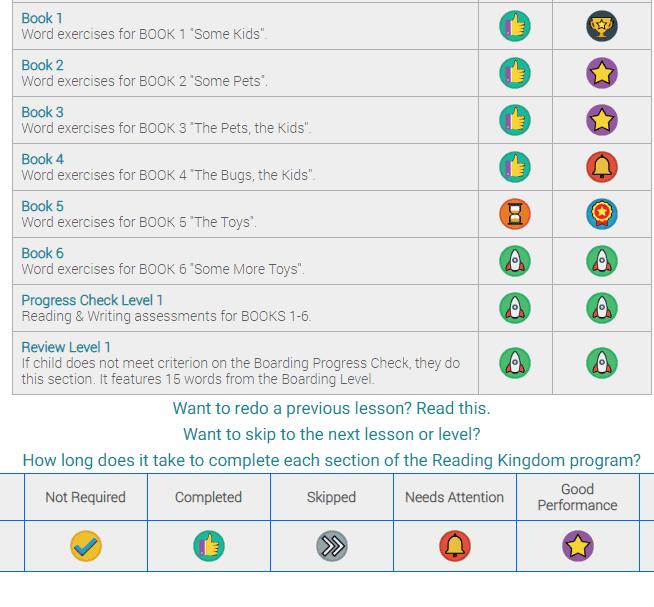
Each child has his/her own dashboard, reached by clicking on their name on the main dashboard. The child is to click on a picture of an owl to continue with the program. You can also check their progress by scrolling down a little; here is the chart showing where Little Miss is with it.  By clicking on the title of one of the sections, you can see the individual lessons, and also use this area to redo a previous lesson.reading kingdom 4

Now, the real question is, does the program work? Will it teach a child to read? I think it can. I know for sure that Little Miss is much more aware of individual words on a page; she was picking out words in the Bible one evening last week as we were reading together. I was pointing to the words as we went, and she learned to recognize a few, quickly, which she had never done before. I haven’t spent enough time watching her do her Reading Kingdom lessons to know if she can read all the words she has been introduced to, but the one time I did stop by her and check, she was able to read the sentence fairly easily. One thing I noticed that she’s picked up from it is the skill of moving from left to right on a page, which is quite important for reading well.

Would I buy a subscription to this program? I might, if it was a matter of needing something educational for my young child to do and I was overwhelmed and not able to spend the time to teach her to read. For children with no major learning issues (I have dealt with severe dyslexia, so that colors all my experiences with this sort of program), it would likely result in a child being able to read fairly well. I don’t see it building a very strong foundation in phonics, though; it seems more like sight reading to me. That being said, though, awhile after we used it two years ago, I introduced “ing” to one of the boys who had been using Reading Kingdom, thinking he had never seen it and would not know what it said. He easily read it, and when I expressed surprise, he told me he had learned it with Reading Kingdom! That showed me that this system can work. Maybe I just think it’s too lazy on my part! Anyway, I’m going to allow Little Miss to continue using it as long as she enjoys it, and see how she progresses. It sure helps me out!

Check it out for yourself! If you go to this page, hover over the Resources tab and you’ll see several sample lessons. Go through a couple of those, and see if this program would be a good fit for your child. Also, click on the image below to see what 31 other families have to say about it. Three families have also used ASD Reading, developed for children on the autism spectrum, from the same company. I always enjoy reading other people’s reviews after I have posted my own.

Reading Kingdom & ASD Reading {Reviews}

Filed Under: Book Reviews Tagged With: Homeschool Review Crew, Homeschooling, Product Review

Product Review—Beyond the Stick Figure Art School

May 12, 2020 by NZ Filbruns 2 Comments

Disclaimer: I received a FREE copy of this product through the HOMESCHOOL REVIEW CREW in
exchange for my honest review. I was not required to write a positive review nor was I
compensated in any other way.

I have a son, Mr. Imagination, who loves to draw and wants to learn more about art. When we were offered the opportunity to use the Beyond the Stick Figure Complete Drawing Course Plus 3 Bonus Courses from Beyond the Stick Figure Art School, he was very enthusiastic. This sounded perfect—a step-by-step, incremental guide to art.

Mr. Imagination and Little Miss working on an art project.

The first several lessons went very well; both he (age 8) and Little Miss (age 5) loved doing the projects, and even Mr. Sweetie (age 10) joined us. We learned about circles and dots, and curved lines and straight lines, and practiced looking for these in objects around the house. We drew circles on paper, and made pages of bubbles, then colored them in with markers. We drew designs with each of the other components of pictures, too, and colored pretty designs. Then, we started drawing flowers. I really liked the projects where we drew a flower in the foreground and then more behind it! I have never considered myself an artist, but I could do that!2-IMG_6335

As we moved on, however, my little ones got bogged down in the repetition. We ended up skipping a large section of lessons so that I could see what the rest of the course was like, in order to tell you in this review, and found a project that they liked better. We got to draw hills, cover the nearest one with grass, and paint the picture with a watercolor wash.5-IMG_6339 Everyone enjoyed that! Unfortunately, because of the lockdown due to COVID 19, we did not have proper watercolor paper. We had to use printer paper, because that’s all we have (we were not able to get more because it’s nonessential), and it doesn’t work well with watercolors.

We also were not able to get the markers that are recommended. I think if we had been able to, the earlier projects would have been much more satisfying. She recommends Prismacolor markers, and they aren’t sold in this country anywhere that I could find, even without lockdown, so I bought the only ones I could find. They were washable, which means the color ran and mixed in ways we didn’t want it to. If you want to use this course, try to find the proper markers (if you live in America, they are on Amazon—shipping is much too high for me to be able to get them that way here). 1-IMG_6334

Anyway, back to the course. The next section, which we haven’t done anything with yet, is about watercolor painting. It looks fun! Even though my little ones are tired of this course, because of the constant repetition, I think I can interest them in the painting part of it. I watched a few of the instructional videos, and in them she was teaching how to create different tones of paint. Once we are able to get watercolor paper, I want to try this. As with all the other lessons, these techniques are taught baby step by baby step. 3-IMG_6336

Further lessons cover acrylic painting and sculpture. I don’t know if we’ll ever get to those lessons. They sound interesting; it’s just that Mr. Imagination feels pretty bored with the lessons we have done. I feel like this course, although it is simple enough for young children to do, would be better for older ones who can understand the need for repetition.

All the lessons are presented as 1-10 minute videos, with the instructor, who happens to be a homeschooling mother herself, talking through what she is doing and wants her students to be doing. She has a lovely British accent (and I can now tell the difference between British and Kiwi!). We did have some issues with the videos. The worst simply had to do with our computer. These videos are from Vimeo, and my computer often freezes when I play Vimeo videos. We had to do a lot of reloading to make them work. Also, the sound is very quiet on some of them, and even with our speakers plugged in, we had to strain to hear her talking. Here is a picture of our dashboard. It is very easy to move from one lesson to the next, although we have to mark each one complete in order to move on. It’s extremely easy to go back to a previously completed lesson!UntitledIf you have a child interested in art, this might be something to look into. It certainly is easy to use; just watch a video to see what materials you will need for a given section, then move on and watch each instructional video and follow directions. Click the image below to read what 80 different families have to say about this course.

Beyond the Stick Figure Complete Drawing Course {Beyond the Stick Figure Art School}

Filed Under: Book Reviews Tagged With: Art, Homeschool Review Crew, Homeschooling, Product Review

Product Review—Home School in the Woods

March 26, 2020 by NZ Filbruns Leave a Comment

Disclaimer: I received a FREE copy of this product through the HOMESCHOOL REVIEW CREW in
exchange for my honest review. I was not required to write a positive review nor was I
compensated in any other way.

Last month, we were offered the opportunity to use and review a product from Home School in the Woods. Untitled 2We really enjoyed doing a history study from them six or eight months ago, and the children were fairly enthusiastic about doing another project now. I gave Mr. Sweetie, Mr. Imagination, and Little Miss the choice of two Lap-Paks, one about Knights and one about Benjamin Franklin. They decided they would like to do the Knights K-2 Lap-Pak, so that’s the one we requested. We’ve been working on the projects in it ever since receiving our download. We haven’t quite finished, but almost. We put the lapbook together yesterday, and got a start on coloring the picture for the cover.
Untitled

There are 12 different little projects to do for the lap book. Each one gives more information about knights. The first project talks about the feudal system in general and how it was organized. There were also projects about the knights’ armor and weapons, and how a king knighted a man (that one was very fun!).

Each project required printing from one to five pages, each on its own PDF, on either white or colored paper or cardstock. I was thankful to have a supply of these on hand from the last time we did a similar-style study! Each project was a little different. Most of the projects have some sort of flaps to lift in order to read information underneath, and a couple of them have several small pages stapled together. One project involved drawing a coat of arms for yourself or your family. Mr. Sweetie remembered seeing a coat of arms that related to our family in a book we have about the Middle Ages, so he based his on that—fun! 5-IMG_6192Two of the projects used paper fasteners to make moving parts, and another has a little “puppet” to show a tournament happening.

This project is a really fun supplement to a study of the Middle Ages. It was something different to do in our school days. We learned a fair amount about knights, and in such a way that the children will remember what we learned. They did get pretty tired of coloring pictures by the end; there is a lot of coloring involved. I had them work on coloring while we read aloud, and that helped. This project was good for developing fine motor skills, and, as one of my boys learned the hard way, it is good for learning to follow directions! I had to reprint one or two projects because they weren’t done correctly.

Pros—fun way to learn
easy way to do a little art
very little preparation time required
all printing is black and white, with one page per PDF
Cons—lots of coloring, which my boys struggle with
quite a few pages to print2-IMG_37012-IMG_61893-IMG_61904-IMG_6191

Will we do more of these projects if they are offered to us? Yes, indeed! We would love to do the Benjamin Franklin lapbook next! Would I buy one? Yes, to use as a supplement to a study we’re doing. These projects are well-thought-out and easy to work into our school days. And by the way, if you’re interested in how the elections work in the United States, this publisher has a Lap-Pak about them. Check out this page if you want to know more about it. Also, if you are curious about lapbooks, I found a very informative blog post about them, here. Click on the link below to see what 79 other families experienced with various products from Home School in the Woods!

Home School in the Woods Collections - Lap-pak, Timeline Figures, History Studies & Activity-Pak {Home School in the Woods Reviews}

Filed Under: Book Reviews Tagged With: Homeschool Review Crew, Homeschooling, Product Review

Product Review—Lets Go Geography, Year 2

February 25, 2020 by NZ Filbruns 1 Comment

Disclaimer: I received a FREE copy of this product through the HOMESCHOOL REVIEW CREW in
exchange for my honest review. I was not required to write a positive review nor was I
compensated in any other way.

A couple of years ago, we had the privilege of reviewing Year 1 of Let’s Go Geography. Mr. Imagination loved it and badly wanted to continue doing it, but last year it was one of the things that completely went by the wayside when I was pregnant. This year I decided to make a point of getting back to it—and then had the opportunity to review Let’s Go Geography,Year 2! He and Little Miss were very excited about getting to be part of this review. I have Mr. Sweetie join in, too, although he isn’t nearly as enthusiastic. We’re really enjoying it, although I didn’t get quite as far during the first few weeks of having it as I would have liked.

So far, we have studied the North and South American continents in general, and created dividers for our ring binders for those continents and Europe. These dividers are something new with the program, which I really like. Having the binder makes it easy to keep the pages together, which was something we struggled with when we did Year 1 awhile back. I gave each of the three children their own binder, and we 2-hole punch all the pages to put in the binders (3-ring binders are almost non-existent in this country—we have to order them online if we want them!). We have also studied the Pacific Northwest states and the Mountain West states. One of the videos we watched for the Pacific Northwest study was about Mount St. Helens. Mr. Sweetie was so intrigued by that that he wanted to write about the volcano for our writing group. He didn’t know enough about it, though, so we’re reading a book I had on the shelf. I love it when their interest in something is sparked by a lesson like that! One of the videos from the Mountain West states was about potato growing in Idaho, and Mr. Imagination wrote about that for his summary of what he learned about those states. He shared that story at our writing group. 30-IMG_3615 As we worked through the next lessons, we’re looking forward to studying Mexico, Honduras, Venezuela and several other Central and South American countries, and then move on to Europe, where, among others, we’ll study England, France and Germany. I’m not sure what contries are studied in the second half of the year, because I haven’t looked ahead at that semester yet. It sure looks fun to “travel” around the world this way, though!Fullscreen capture 2252020 40431 PM Each lesson is laid out in the same format. We start with map work. On a map of the continent, we color the country we’re studying, and then color a flag of that country and glue it onto a page with another map of the continent. We listen to the national anthem and a song from the country, and watch several videos on safeYouTube about the country or region, then write on a notebooking page that’s provided about what we learned. Then, there is a coloring picture, and a craft. Mr. Sweetie’s favorite part of each lesson is watching the videos, and I think Mr. Imagination and Little Miss love the crafts best. So far, we got to do some painting for the first one, with a mountain scene (which inspired Mr. Imagination to paint his own version immediately afterward!), and then we cut and glued paper to make a desert sunset with cactuses silhouetted in front. 28-IMG_3613The day we were working on that one, we had just started when we had a surprise visit of a few people, including two young girls, from a local, very restrictive religious commune. The girls were very shy, and I was praying desperately about what we could do with them, and got the idea to include them in the craft. It was the perfect thing to get them doing something with our children, and they seemed to enjoy it. So, the timing was perfect with that—praise God!24-IMG_360329-IMG_3614 I’m loving Let’s Go Geography for several reasons. The most obvious is, of course, that we get some geography lessons in and learn about different parts of the world. Another benefit is that we sometimes get a story for our writing group out of the lesson! This program is also providing some art lessons for my children, which is something we have really lacked. I’m excited to be able to provide my little ones with more ways to be creative, since I don’t have the imagination to come up with projects on my own. If you would like to include geography into your homeschool, check out Let’s Go Geography—it’s great for the primary grades! Forty-nine homeschool families have been using this program lately. Click the image below to read what they have to say about this great program!
Geography for Kids - Year 2 {Let's Go Geography Reviews}

Filed Under: Book Reviews Tagged With: Homeschool Review Crew, Homeschooling, Product Review

Product Review—SchoolhouseTeachers.com

January 8, 2020 by NZ Filbruns Leave a Comment

Disclaimer: I received a FREE copy of this product through the HOMESCHOOL REVIEW CREW in exchange for my honest review. I was not required to write a positive review nor was I compensated in any other way.

For the past three years, ever since I joined the Homeschool Review Crew, we have had a subscription to SchoolhouseTeachers.com. This year, again, we were given the Ultimate PreK-12 Annual Membership. I spent about three hours one afternoon exploring the courses that are available on this website, and barely scratched the surface. There are so many resources here! It’s almost overwhelming. To use it properly, you would need to know what you want, and then search for that, specifically, then branch out into the fun things that you find.Untitled

We’re taking our summer holiday right now, so we haven’t been doing much school during this review period. I did find a few fun courses to do. Mr. Imagination loves cooking, so we started using review 2Sue Gregg’s Whole Foods Cooking Lessons Archives. Her cookbook is divided up into 14 weeks of lessons. Lots of topics are discussed; it was a great chance to teach all the children about why I like to soak our grains before we eat them. There are several lessons involving grains, and then the course moves on to beans, and then animal protein. We haven’t gotten very far in this yet, but I like what we have used! The lessons include the printable recipe, and a series of pages showing every step of the recipe in photographs. My favorite feature, though, is the Talking Food Pages, where she teaches the why behind her choices, such as soaking the grains, or using real butter rather than margarine.

Another course we started is American History in Picture Books. We’re working our way through American history right now (we have been for the past two years because we have found so many wonderful books to read!), so Ireview 1 didn’t start at the beginning of this course. Instead, we jumped to Unit 6, which is scheduled for Weeks 22-24 of this 58-week course, and read the books I was able to come up with for that unit. The focus was on Lewis and Clark, the War of 1812, and the Erie Canal. I definitely want to continue using the book recommendations in this course to supplement what we’re already using. These are my favorite type of picture books!

I also bookmarked two geography courses, Trek to the Holy Land and Beyond, and Everyday Explorers Australia Archive, which also covers New Zealand. These look really fun—I’m hoping I can work in time for some geography this year! There are also two more cooking courses in my bookmarks tab. They look fun, too. I like the thorough lessons plans that are included. Each course is broken down into daily lessons, with all the information you need to teach, every day, and boxes to tick off so you can keep track of what has been accomplished.

You can put together a complete curriculum for your whole family from SchoolhouseTeachers.com. They have courses for every subject—Math, Language Arts, Social Studies, Science, Art…you name it, they have it—and for every grade. The courses are easily searchable by grade or by subject, as well. Just be prepared to spend a lot of time looking, as it’s so easy to get off onto rabbit trails, with all the fun courses there are. And then there is the World Book library, which I haven’t even looked at yet….

We also enjoy the video library. There are video courses for every subject. Our favorites, of course, are the history ones. Some of my boys ask, occasionally, if they can watch a Drive Through History movie (we wish there were more available, but enjoy the ones that are there), or a Torchlighters movie about a hero of Christian history. In the past three years, we’ve watched some of those several times.

SchoolhouseTeachers.com is truly a great resource for the Christian homeschooling family. I’m hoping to utilize it more fully this year than I have in the past—we’ll see if I can remember to do that!

A good many other families are also using SchoolhouseTeachers.com right now, and describing their experiences. Find their reviews by clicking on the banner below!

Online Homeschooling For the Whole Family {SchoolhouseTeachers.com Reviews}

Filed Under: Book Reviews Tagged With: Homeschool Review Crew, Homeschooling, Product Review

  • « Go to Previous Page
  • Page 1
  • Page 2
  • Page 3
  • Page 4
  • Page 5
  • Page 6
  • Interim pages omitted …
  • Page 8
  • Go to Next Page »

Primary Sidebar

  • RSS Feed
  • Facebook
  • YouTube
  • Goodreads

Recent Posts

  • Book Review–The Bible Companion Book 9 Hosea-Malachi
  • August 2026 Photos
  • New in the Library! August 2026
  • Lemons!
  • More of Elijah’s Pictures

Archives

Disclosure

Some links on this site are affiliate links.

Subscribe to the Blog

/* real people should not fill this in and expect good things - do not remove this or risk form bot signups */

Intuit Mailchimp

The Family:


Dad and Mom (Gayle and Emma)

Girl #1, Esther, my right hand

Boy #1, Seth (Mr. Handyman)

Boy #2, Simon (Mr. Inventor)

Boy #3, Mr. Intellectual

Boy #4, Mr. Diligence

Boy #5, Mr. Sweetie

Boy #6, Mr. Imagination

Girl #2, Little Miss

Girl #3, Miss Joy

Book Reviews Website

IgniteLit

COPYRIGHT © 2026 · TWENTY SEVEN PRO ON GENESIS FRAMEWORK · DISCLOSURE & DISCLAIMER · PRIVACY POLICY